

I spent two years blaming my chair for a neck that ached by four in the afternoon, and then a client sent me forty pages of drawings to markup and I sat in the same position for nine hours. That day I looked up what the top edge of a monitor should be. Mine was six inches too low. The quick fix was a stack of books, but books wobble, and I ordered the VIVO single monitor desk mount, the STAND-V001 model with the C-clamp base, after a friend with a similar arm said I would not regret it. I have used it for fourteen months now, and I will tell you the parts that still annoy me before I tell you the parts I like.
The Quick Verdict
A sturdy, adjustable arm that fixed my monitor height for good, but expect a fiddly tilt joint, a clamp that needs periodic tightening, and a manual that forgets to mention desk aprons.
Amazon Check Today's Price →Before You Buy, Measure the Underside of Your Desk
The C-clamp fits a top thickness up to 3.3 inches, but the clearance under my desk apron nearly made this a return. Check today's price and the mounting specs before you order.
Amazon Check Today's Price on Amazon →How I've Used It
I mounted the VIVO arm on the same desk I have used since 2019, a 2.5 inch thick hardwood slab that runs the long wall of my ten by eleven spare bedroom office. The desk sits under a single north-facing window on my left, and the beige carpet means I cannot roll my chair as smoothly as I would like, but that is a separate problem. I removed the stand from a 27 inch Dell monitor, attached the VESA plate with the four screws in the included bag, and hung the screen on the arm with a folded towel under it so the clamp did not scratch the aluminum. The whole task, from cutting the zip ties to plugging the display back in, took one hour and twenty minutes. The included Allen wrench did everything.
On a normal writing day, which for me means four to six hours of drafting and editing technical manuals, I raise the monitor slightly in the morning and I do not touch it again until I push it back against the wall at night. The gas spring has held the height without drifting for months. But I do not leave the screen in one position all day. Two or three times a week a client sends a drawing set that needs to be read vertically, so I turn the monitor ninety degrees into portrait. That motion has always been smooth. The base swivel has enough friction that I can angle the monitor toward the door when someone comes in, and it stays where I put it rather than slowly swinging back.
Three afternoons a week I leave the desk for a video call, and the arm is the reason I can keep my notes on screen without leaning in. I pull the monitor six inches closer to the keyboard, and it stays there while I talk. Then I push it back. The monitor has never drifted a millimeter on its own in the six months since I stopped fiddling with the collar, which is more than I can say for the cheap laptop stand I used before.
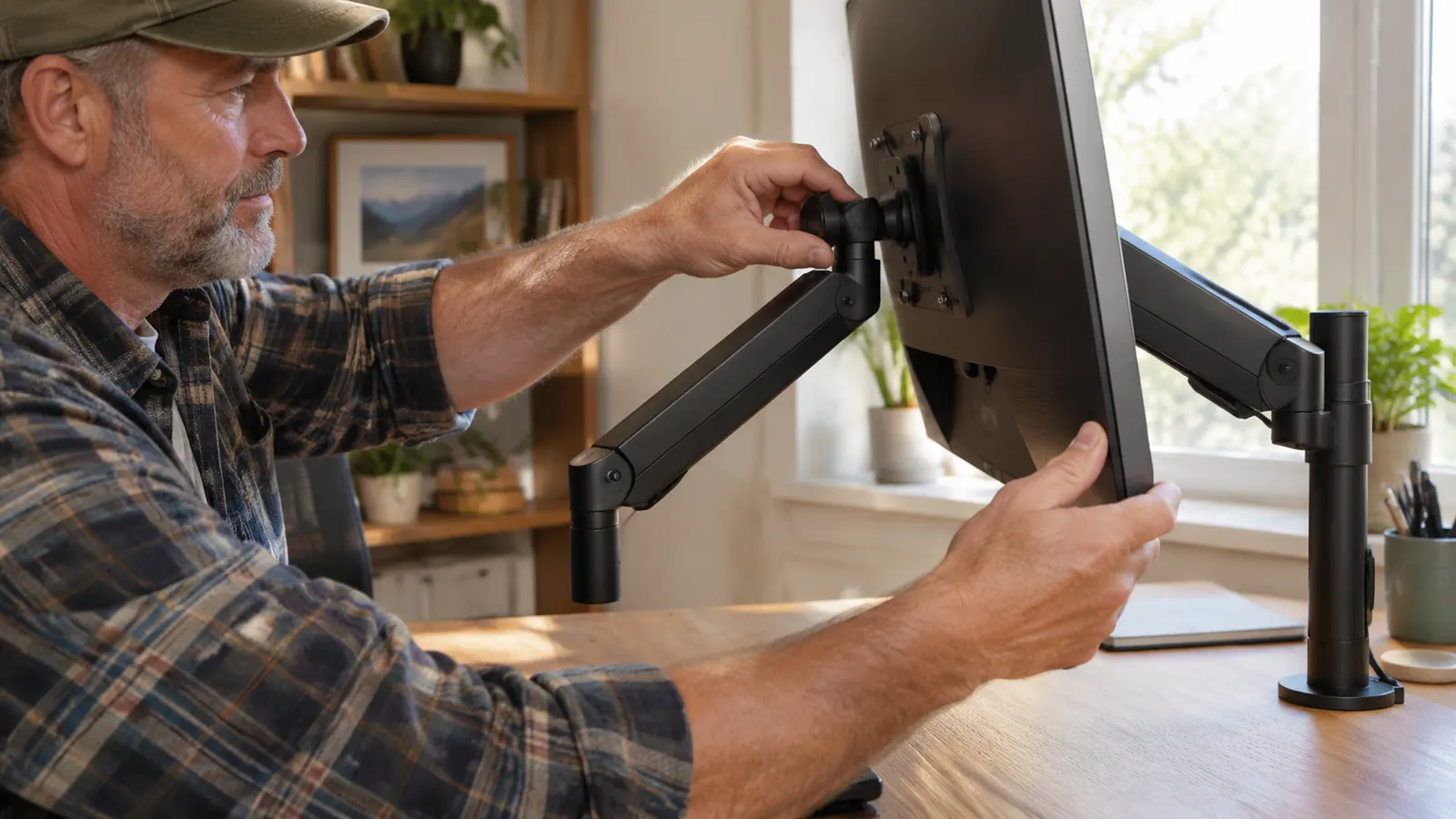
The Installation Nobody Shows You
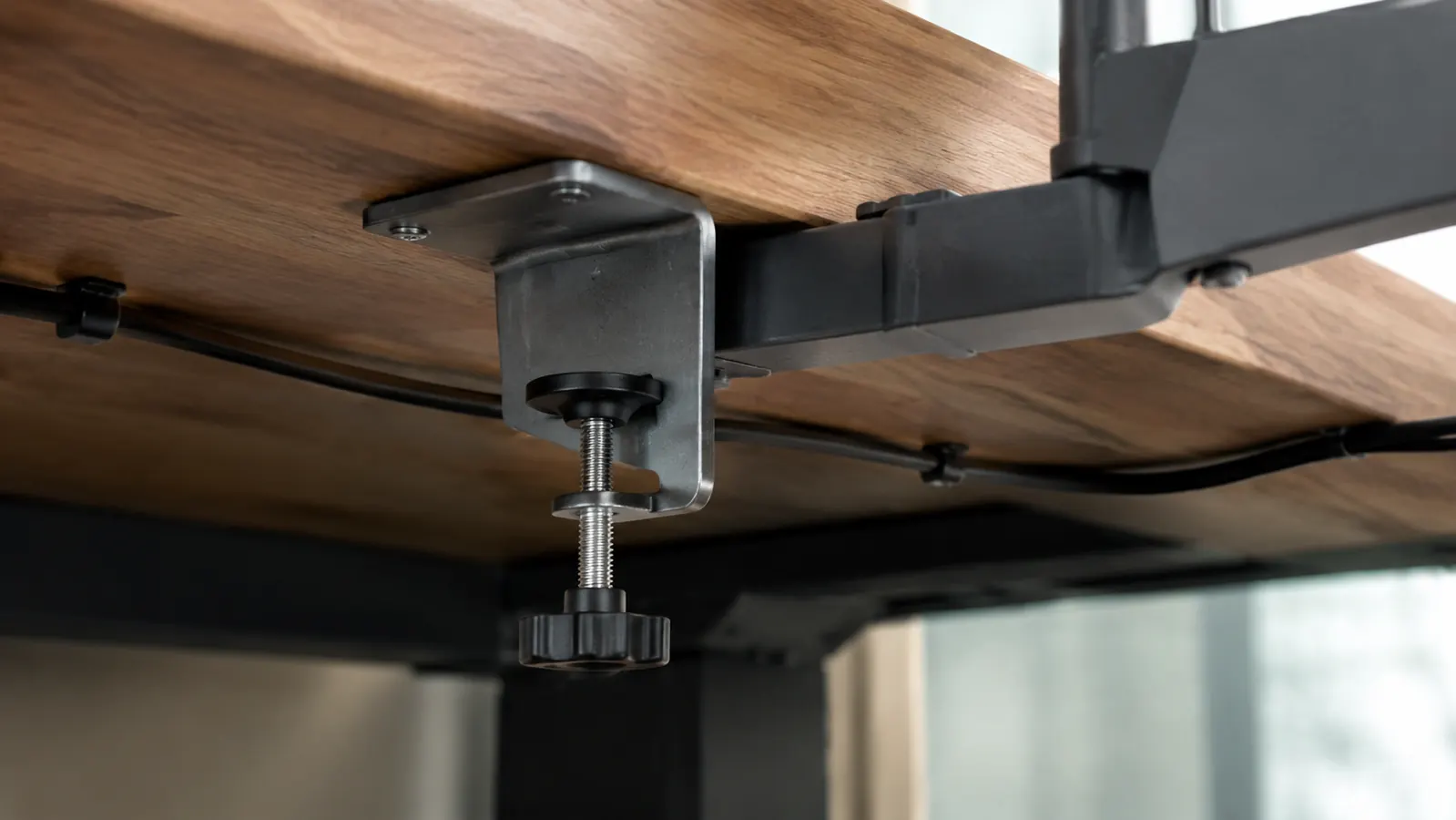
The installation sheet has one drawing per step, and the drawing skips the step that cost me my first evening. The C-clamp arrives as two pieces: the top jaw that bolts to the arm and the lower plate that you spin up from underneath. On a desk with a clean underside, you just turn the handle or the screw and it grips. But my desk has a wooden apron running along the front, and the lower plate hits that apron before the clamp touches the underside of the desktop. I measured 2.5 inches of desk thickness at the top, then discovered there was only about 1.5 inches of open space underneath, which is the number that actually matters.
The solution was to rough-tighten the clamp before attaching the arm, then slide the arm in and finish with the Allen wrench. You also need something between the clamp and the wood if you care about the finish; the metal teeth will leave a mark. Even now, a year later, when I move a pen under the desk it catches on the paint ridge left by the clamp. I cleaned that spot and put a thin rubber pad under the plate, but the mark is there forever. Use a scrap of cardboard or an old mouse pad from the start.
The other installation catch is the tilt screw on the VESA plate. The instructions show it from the side, but they never say that once the monitor is mounted, the screw is behind the screen. You can reach it by tilting the monitor forward, but you are working blind. I set the angle while the screen was face down on the towel, then spent the next day making quarter turns to remove a glare from my overhead light. That is a ten minute job if you do it before you hang the screen, and an hour if you do it after.
What the Adjustments Are Really Like
The height adjustment is the one the product video makes look easy, and it is not a single handed motion. You loosen a collar at the back of the arm, take the weight of the monitor with your other hand, and slide the whole thing up or down. The gas spring does counterbalance the screen, but there is a narrow band where the monitor feels weightless. Above that band it wants to float up, and below it wants to sink. I found the right spot after about ten tries, tightened the collar more firmly than I expected to need, and I have not touched the height since.
The rotation to portrait is the best feature on this arm. The joint at the VESA plate turns a full ninety degrees and locks with a solid click. I use portrait mode whenever a client emails a multi page schedule or a floor plan, and I can switch back without moving the height. The swivel at the base is also stiffer than I expected, which is good. When my chair arm bumps the desk or I lean on the front edge to reach something, the monitor does not swing out of position. Friction in a mount is a rarely advertised feature and one VIVO seems to have deliberately built in.
Now the part I complain about. The tilt screw loosens over time, and the screen slowly tips forward until it is about two degrees past where I set it. I tightened it three times between March and October. The collar uses a bolt that holds better if you add a drop of thread locker, which is not in the manual. I have not tried that yet because I am wary of anything that makes the joint permanent. It is a minor annoyance, but it is the difference between an arm that feels like a tool and one that feels like finished furniture.
The Day I Regretted Buying It
The moment of doubt came in April, about three months after the install. I was on a call and I needed to look at my laptop, so I pushed the monitor to the left. The whole arm dropped maybe six inches and stopped with a scrape against the edge of the desk. My heart was in my throat. The VESA plate held and the screen did not fall, but I spent the rest of the call with my hand on the monitor, ready to catch it. When the call ended I crawled under the desk and found the lower clamp plate had rotated about thirty degrees from where I had left it.
What caused it was my own caution. I had not tightened the clamp enough on installation day because I was afraid of denting the desk, and a few months of pushing and pulling the arm slowly worked the nut loose. It is not a design flaw; it is a torque problem. The fix took fifteen minutes with the included wrench, and I have not had a repeat since I moved the clamp to the flat part of the underside and gave it an honest, firm tighten. I would recommend everyone check their clamp after the first week, the way you check a new car seat after the first drive.
The other regret is that I did not measure the space below my desk before ordering. The product page says the C-clamp fits a surface up to 3.3 inches thick, and my 2.5 inch desktop is within that range, so I assumed it would fit. But the clamp needs room under the desk for the lower plate and the screw handle. My desk has a support rail that leaves only 1.5 inches of clearance, not enough for my hand and the wrench at the same time. If your desk has any kind of modesty panel, crossbar, or drawer on the underside, get the grommet mount version instead, or plan to mount the arm on the back edge.
Fourteen months after install, the monitor has never dropped on its own, and the only thing I have had to retighten is the tilt screw.
Alternative Mounts I Considered
Before I ordered the VIVO, I compared it to a pole mount with a foot plate and to a wall mounted articulating arm. The wall arm appealed to me because it tucks out of the way, but my desk sits under a window on the left and the glare would have been constant in the afternoon. The pole mount can raise a monitor higher than any desk clamp, but it needs a heavy base or a drilled hole, and this is a rental house, so no holes in the walls or furniture. The VIVO arm is a compromise: it bolts to the desk with a clamp, it swings out when I need it, and it holds the screen at eye level without touching any wall.
I also thought about buying a second arm for the laptop that shares my desk, but I am glad I did not. Two arms on the same 60 inch desktop would have fought each other for clamp space under the desk, and my knee room is already tight. The VIVO arm holds the main monitor, and I keep the laptop on a simple aluminum stand to its left. That leaves the arm free to do the one job I need it for, which is putting the main screen at the right height. More than one arm in a ten by eleven foot office would be clutter.
What I Liked
- Holds a 20 pound monitor at eye level with zero drift for months.
- Rotates ninety degrees to portrait easily and locks in place.
- Base swivel stays put when the desk gets bumped.
- Installs with the included wrench and no extra tools.
Where It Falls Short
- The tilt screw loosens over time and needs regular retightening.
- The cable management channel is shallow for thick display cables.
- The clamp needs clean space underneath, not just a desktop that is thin enough.
- The manual does not mention desk aprons or thread locker.
What I'd Tell a Friend Before They Buy
If your neck hurts because your monitor is too low, the VIVO arm will fix that. It did for me. My screen now sits with the top edge at or slightly below eye level when I sit up straight, and that is the single best thing I have done for my posture since I started working from home in 2019. But the arm will not fix a bad chair or the habit of sitting for three hours without standing. I still use a timer to remind myself to walk to the kitchen every forty five minutes, and I still have a lower back that complains if I ignore it. The arm just removes one more excuse.
The practical advice I did not follow is to measure the underside of your desk before you order and to keep the box for the first month. The arm is a solid piece of steel and if the clamp does not fit your desk, returning it without the original foam would be a problem. I also wish someone had told me to tighten the four VESA screws in a crossing pattern, exactly like a car wheel, so the plate pulls flat against the back of the monitor. A plate that is even one degree crooked makes the screen look tilted no matter how carefully you set the joint.
Who This Is For
Buy the VIVO arm if you have a single monitor between 22 and 32 inches, a desk with a clean underside, and a job that puts you in front of the screen for hours at a stretch. It is ideal for people who toggle between a document and a video call, because the pull forward motion is smooth and the screen stays where you leave it. It also fits a rental friendly setup, since the clamp does not leave holes and the only permanent mark is a faint circle under the desk that a guest will never see. If that describes you, this arm will likely be the last mount you buy for that room.
Who Should Skip It
Skip the VIVO if your desk has less than two inches of clearance underneath, or a decorative lip that blocks the clamp. Skip it if you need to change monitor height ten times a day, because the collar adjustment takes two hands and a bit of patience. And skip it if you plan to mount a monitor well over twenty pounds; the arm will hold it, but a heavier screen makes the tilt joint loosen faster than it already does. For those situations, a gas spring pole mount or a wall arm with a larger tilt mechanism is worth the extra money.
Still Deciding? Measure the Underside First
If your desk has a clean 2 inches of clearance under the mounting spot, this VIVO arm is a very good one and it has served me well for over a year. Check today's price and the fit guide before you order.
Amazon Check Today's Price on Amazon →